 EN
EN
 AR
AR BG
BG HR
HR CS
CS DA
DA NL
NL FI
FI FR
FR DE
DE EL
EL HI
HI IT
IT JA
JA KO
KO NO
NO PL
PL PT
PT RO
RO RU
RU ES
ES SV
SV TL
TL ID
ID LV
LV LT
LT SR
SR SK
SK SL
SL UK
UK HU
HU MT
MT TR
TR AF
AF MS
MS GA
GA IS
IS MK
MK HY
HY KA
KA

PVC Patch Design Ideas: How Color, Shape and Depth Create Impact
A successful PVC patch design does more than reproduce an image. It transforms color, shape, typography and depth into a compact visual object that can be recognized immediately.
The flexible molded surface of PVC gives designers opportunities that are difficult to achieve with ordinary printing or embroidery. Lines can be raised, backgrounds can be recessed and individual design elements can sit at different levels. Bold color sections also help illustrations remain visible on hats, jackets, backpacks and equipment.
The four examples in this article demonstrate different approaches to PVC patch design—from a detailed fantasy illustration to clean typography, dimensional symbols and an application-focused hat design.
1. Begin With a Strong Silhouette
The outer shape is the first part of a patch that viewers recognize. Before they read the wording or examine the illustration, they see the overall silhouette.
A circle creates a balanced and familiar appearance. It works especially well for emblems, location designs, event graphics and designs containing text around a central illustration.
An irregular outline creates a more energetic and distinctive result. It can follow the shape of an animal, character, object or logo instead of placing every design inside the same standard frame.
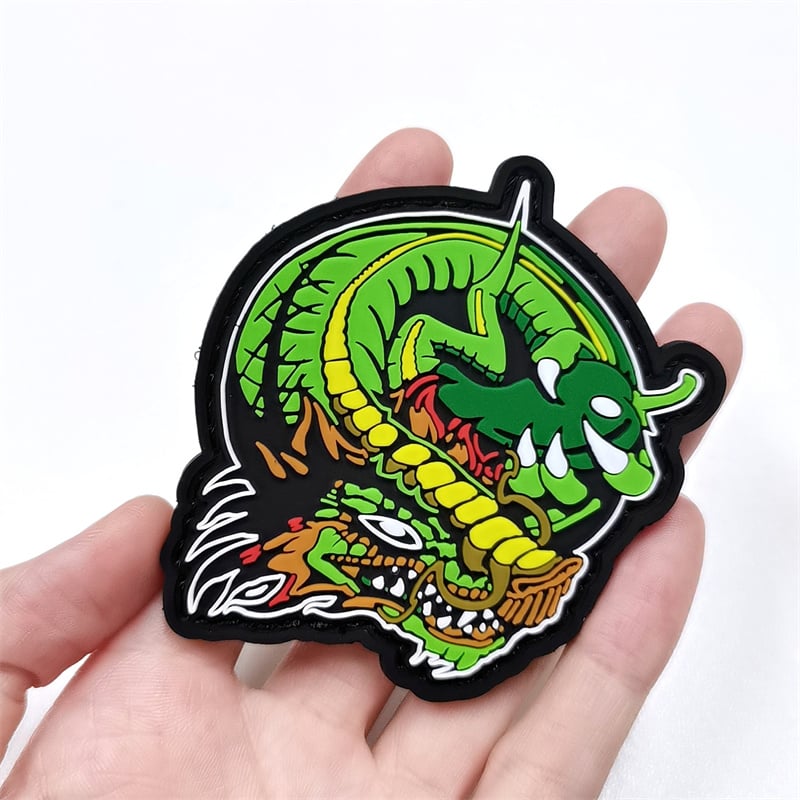
The dragon patch uses an asymmetrical silhouette that follows the movement of the horns, face and surrounding shapes. Even when viewed from a distance, its outline feels active and recognizable.
A strong silhouette should:
- Be recognizable without relying on small details
- Support the main subject of the design
- Avoid unnecessary projections
- Feel balanced when viewed from different angles
- Remain suitable for its intended placement
2. Use Color to Establish Visual Hierarchy
PVC patches are particularly effective when designed with clear, solid color areas. Rather than relying on subtle gradients, the designer can use contrast to separate the subject, background and supporting details.
The dragon design uses black as both a background color and a visual separator. Bright green becomes the dominant color, while yellow, red, brown and white guide attention toward the face and horns.
This creates a clear color hierarchy:
- The dominant green identifies the main character.
- The black background creates contrast.
- Yellow highlights the horns and central details.
- White draws attention to the eyes, teeth and outline accents.
- Red and brown add warmth without competing with the main subject.
A strong PVC patch color palette does not always require many colors. Three or four carefully selected colors can often produce a more memorable result than a crowded palette.
When choosing colors, consider:
- Which color should attract attention first?
- Does the design remain clear against the background?
- Are neighboring colors different enough?
- Can one neutral color unify the composition?
- Will the colors remain effective on the final garment or product?
3. Simplify Complex Illustrations Into Clear Sections
Highly detailed artwork may contain texture, shadows, highlights and hundreds of small lines. A successful patch interpretation reduces this information into a clearer graphic language.
The dragon patch retains its dramatic expression without attempting to reproduce every shaded area of the original illustration. The subject is divided into large color sections with strong black outlines.
This approach is similar to creating an icon or emblem. The designer identifies the most important visual features and removes details that do not contribute to recognition.
When simplifying an illustration:
- Preserve the eyes and facial expression.
- Retain distinctive shapes such as horns, wings or equipment.
- Combine small shadow areas into larger sections.
- Replace gradients with separate solid colors.
- Use outlines to distinguish overlapping elements.
- Remove decorative details that disappear at the final size.
Simplification does not mean making the design boring. It means deciding which details deserve attention.
4. Design for the Actual Product Placement
A patch should be designed as part of the final product rather than as an isolated graphic.
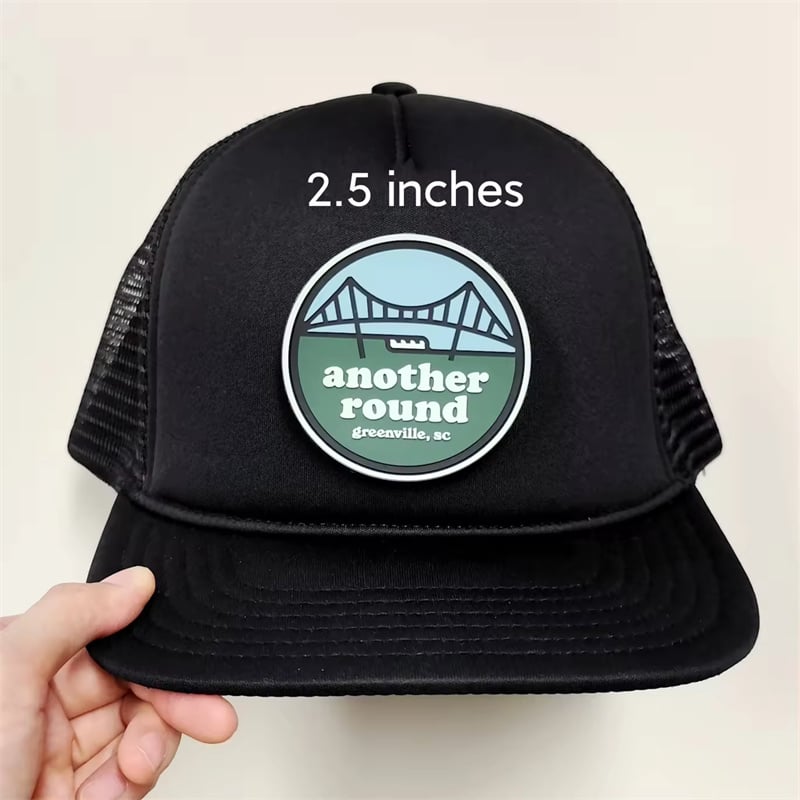
The round patch shown on the black trucker hat demonstrates how shape, scale and contrast work together. The circular form fits naturally within the front panel, while the pale blue, green and white palette remains clearly visible against the black fabric.
The approximately 2.5-inch size gives the design enough presence without dominating the entire hat.
When designing a PVC patch for a hat, consider:
- The usable width and height of the front panel
- The curvature of the cap
- The color of the fabric
- The viewing distance
- Whether the text remains readable
- How much empty space surrounds the patch
A patch that looks impressive as a large digital image may lose clarity when reduced. Viewing the artwork at its intended physical size is an important part of the design process.
5. Let Typography Become Part of the Artwork
Typography can function as more than information. Letter shapes, spacing, color and depth can become the central visual elements of a PVC patch.
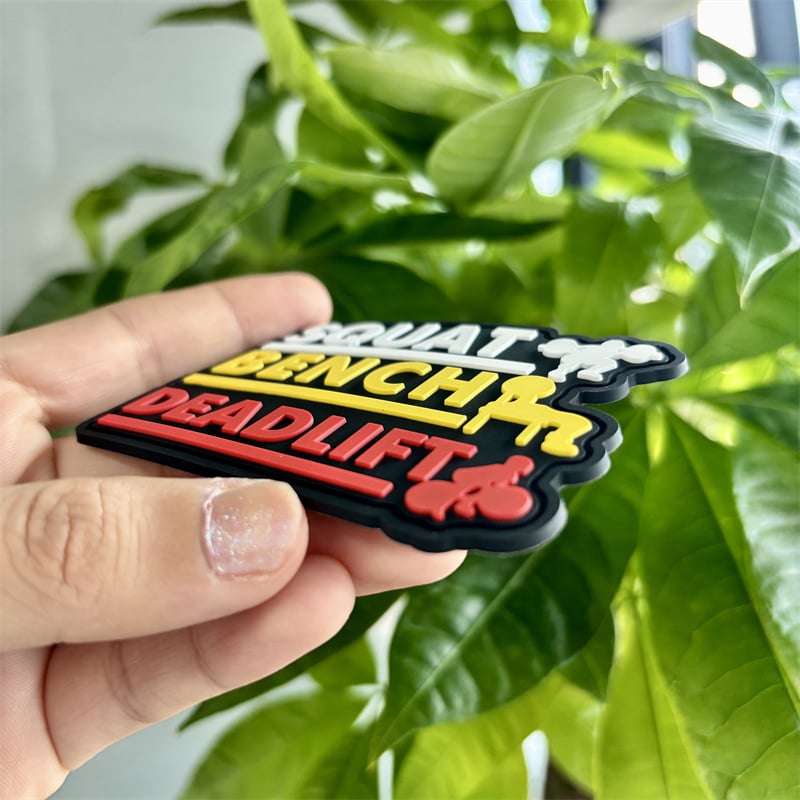
The three-color lettering patch uses white, yellow and red text against a black base. Horizontal divider lines organize the information, while the raised letters create shadows that strengthen the dimensional effect.
Effective typography for PVC patch design generally includes:
- Bold letterforms
- Clear spacing
- Strong contrast
- Short, memorable wording
- A visible difference between primary and secondary text
- Consistent alignment
Long phrases and thin fonts can reduce readability. A designer should determine which word carries the main message and give it the greatest visual weight.
Color can also separate different parts of a phrase. In the example, each line uses a different color, making the wording easier to scan while adding energy to the design.
6. Create Depth With Raised and Recessed Layers
One of the most distinctive characteristics of PVC patch design is the ability to work with physical height.
Flat color sections produce a clean 2D appearance. Raised areas introduce a tactile 3D effect. Combining the two creates a stronger sense of hierarchy.
The lion and boxing-glove patch uses multiple levels to separate the central figure, gloves, lettering, decorative branches and background.
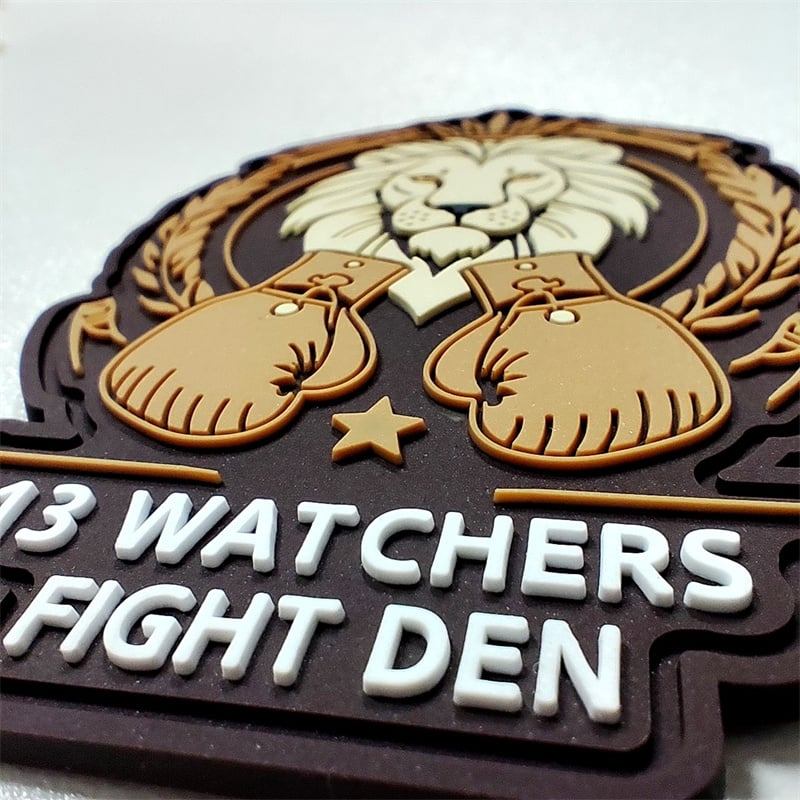
The raised elements catch light and produce natural shadows. This makes the design feel more dimensional even though the overall patch remains relatively thin.
Depth can be used to highlight:
- A central character
- A brand name
- Large letters
- A symbol or mascot
- Decorative borders
- Foreground objects
- Important outlines
Not every element needs to be raised. If all parts of the design use the same level of emphasis, the visual hierarchy becomes weaker.
A more effective approach is to choose one primary focal point, one supporting level and a quieter background.
7. Use Lines to Separate and Connect Elements
Lines perform several functions in PVC patch design. They divide colors, define shapes, guide the eye and connect individual parts of the composition.
The examples use different line strategies:
- Heavy black outlines create a graphic illustration style.
- Fine raised lines add details to the lion and gloves.
- White outlines create contrast on a black base.
- Horizontal lines organize typographic content.
- Circular borders contain an emblem-style composition.
Line thickness should correspond with visual importance. Major outlines should be stronger than internal details. If every line has the same weight, the image may feel flat or visually crowded.
8. Balance Detail With Negative Space
Negative space is the open or visually quiet area surrounding the main design elements.
The circular hat patch includes open areas around the bridge and lettering, which makes the layout easier to read. In contrast, the dragon patch uses a dense composition because its objective is to create energy and intensity.
Both approaches can work, but the density should support the subject.
Use more negative space when designing:
- Minimal brand marks
- Location emblems
- Text-based designs
- Corporate graphics
- Small hat patches
Use a denser composition for:
- Fantasy illustrations
- Mascots
- Character artwork
- Club emblems
- Large statement patches
Even a detailed design needs small resting areas. Without them, colors and lines can merge into a single visual mass.
9. Match the Design Style to Its Audience
The visual style should reflect where the patch will be used and who will wear it.
A bright fantasy illustration can work for gaming communities, artists, entertainment projects and creative merchandise. A clean circular emblem may suit local events, hospitality brands or lifestyle apparel. Bold dimensional lettering can create a strong look for clubs, sports groups and team identities.
Possible PVC patch design directions include:
- Minimal logo designs
- Vintage emblems
- Outdoor and adventure graphics
- Tactical and military-inspired layouts
- Sports and team designs
- Motorcycle and automotive themes
- Mascot illustrations
- Typography-based statements
- Location and landmark designs
- Fantasy and character artwork
A consistent design style can also connect several patches into a collection. Shared colors, border thicknesses, typography or shapes allow different graphics to feel related.
10. Review the Design at Actual Size
Before finalizing a patch design, display the artwork on screen at approximately its real physical size.
Ask the following questions:
- Can the main subject be identified immediately?
- Is the most important wording readable?
- Do any lines appear too close together?
- Are there too many competing colors?
- Does the design still work without zooming in?
- Is the silhouette clear?
- Does the patch suit the garment or item where it will be placed?
The goal is not to preserve every element from the original artwork. The goal is to create a strong patch that communicates clearly at the final size.
Final Thoughts
Strong PVC patch design depends on a clear visual idea. Shape establishes identity, color guides attention, typography communicates the message and raised layers add physical depth.
The most effective designs do not treat the patch as a reduced version of a poster or digital illustration. They use the qualities of PVC—solid colors, defined lines, flexible shapes and dimensional surfaces—as part of the creative process.
Whether the style is minimal, typographic, illustrated or highly dimensional, the design should remain recognizable, balanced and appropriate for its final application.


